


Manga Dogs : Manga & Comics
0.00.00 Reviews
App Specs
- Version
- 1.0.0
- Updated On
- License
- Free
- Downloads
- 10,000+
- Developer
- LuminaCode
- Categories
- Comics
- Platform
- Android
Screenshots
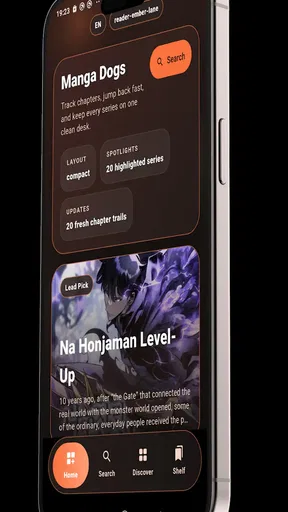
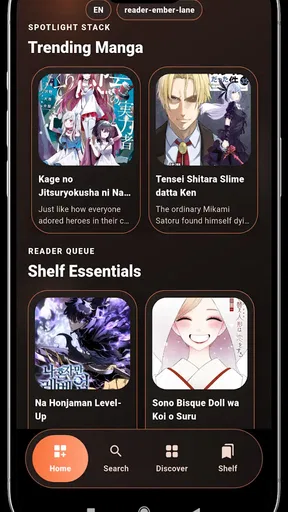
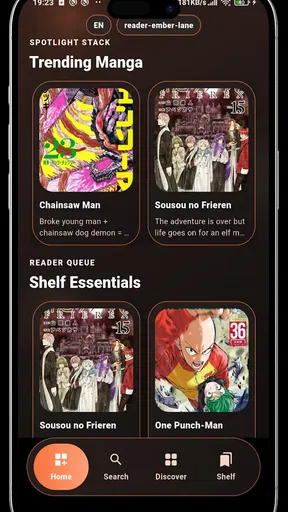
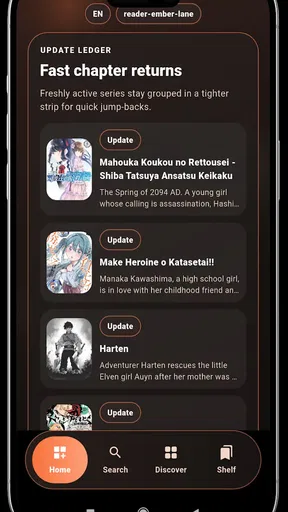
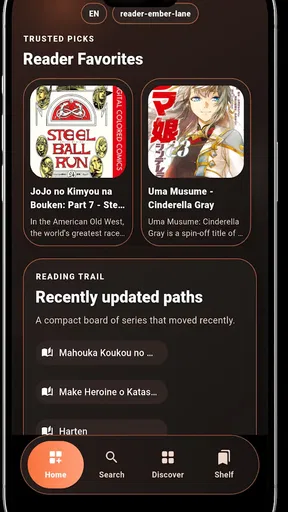
 Analysis by AppCompare
I spent time with Manga Dogs as a comics reader, and my first impression was straightforward: it aims to make finding and reading manga, comics, manhwa, and webtoons feel less complicated. That focus matters because people often move between several reading formats, and each one can behave differently in a conventional reader. Here, the appeal is having one place to explore those formats instead of treating manga and vertical webtoons as completely separate habits.
This is a free Android app from LuminaCode, listed for Everyone and available for devices running Android 7.0 or later. It is currently at version 1.0.0, with more than 10K installs, so I approached it as a relatively young reader rather than a mature platform with years of refinement behind it. That distinction shaped my opinion: the basic idea is easy to understand, but the value depends heavily on how carefully you organize your reading routine.
How I used the reader from the first launch
My baseline workflow was simple. I opened the app, explored the available comic material, chose something that matched the format I wanted at that moment, and settled into reading rather than spending too long adjusting everything. That is the right starting point for an app like this. A reader should not require a complicated setup before you can enjoy a chapter, and Manga Dogs presents itself around quick discovery and uncomplicated reading.
The distinction between formats is important in daily use. Manga is usually designed around page progression, while manhwa and webtoons are commonly consumed through a longer vertical flow. Comics may use layouts that reward pausing and inspecting a panel rather than swiping quickly. I found it useful to decide what kind of reading session I was having before opening a title: a focused chapter, a few minutes of vertical scrolling, or casual browsing across different styles.
That small decision prevents one of the most common frustrations with multi-format readers: treating every title as if it deserves the same pace. A vertical webtoon can feel awkward if I approach it like a page-by-page manga chapter, while a traditional comic can lose its visual rhythm if I rush through it. Manga Dogs is most useful when I adapt my behavior to the material instead of expecting the app to make every format feel identical.
A realistic everyday example is a short break during a commute or lunch. I would open the app with a specific intention, browse briefly, and read a manageable section rather than starting with an endless search for the perfect series. Later, at home, I could return to a longer chapter and give the artwork more attention. The app fits both situations, but the experience improves when I treat discovery and reading as separate steps.
Building a repeatable reading habit
I recommend choosing a small group of titles that match different moods instead of repeatedly browsing the entire catalog. One can be a fast vertical read, another can be a slower manga, and a third can be something visually dense. This is not a special feature claim; it is a practical way to use a broad comics reader without letting the breadth become distracting.
Worth Reading Before You Choose

Flipboard Shows What News Apps Must Do Beyond the Feed

Switching to Android Auto Means Rethinking Your Driving Routine

Google Calendar Makes a Crowded Week Easier to Manage

Ludo King Makes the Most of the Minutes Between Plans

Baby Panda World Brings Quick Play to Modern Phones, but Its Game Library Feels Busy

ESPN’s Live Game View Makes Following Close Games Easier
For new users, the best first test is not simply whether the app contains a favorite series. I would check how quickly I can locate something interesting, whether the reading direction feels natural, and whether returning to a title is comfortable. Those three moments reveal more about the app’s usefulness than a quick look at its store summary.
I also found that reading in short sessions exposes weaknesses sooner than a long uninterrupted session. If navigation feels unclear, or if I am unsure where I left off, that friction becomes obvious after switching away and coming back. Anyone considering Manga Dogs should test that return journey early, because a reader is judged as much by continuity as by its first chapter.
Settings and habits worth checking before settling in
Because the app is positioned as a fast and easy reader, I would begin with the controls that affect the basic act of reading rather than changing everything at once. Check how page movement or vertical scrolling feels, how easily you can advance, and whether the display suits the way you hold your phone. The most comfortable setup is personal: some readers want deliberate page changes, while others prefer an uninterrupted vertical flow.
It is also worth checking the behavior of the back button and the transition between browsing and reading. A reader can be visually pleasant yet frustrating if leaving a chapter makes it difficult to return to the same place. I make a habit of opening a title, reading a little, leaving it, and then trying to find it again. That simple test answers a practical question that screenshots cannot: does the app support the way I actually read?
Screen orientation deserves attention too. Manga and comics often benefit from a stable portrait view, while a wider panel may be easier to inspect when the phone is held differently. I would not assume that one orientation is best for every title. Instead, I would test a conventional page, a detailed panel, and a long webtoon section. That gives a more honest sense of whether the reader works across its stated range of formats.
Another useful habit is to adjust the phone’s own display settings when needed rather than expecting the app alone to solve every comfort issue. Brightness, text clarity, and the timing of the screen turning off can affect a reading session as much as an in-app control. If I am reading at night, I prefer a setup that reduces glare without making artwork look dull. If I am outside, legibility becomes more important than preserving a cinematic look.
I would also pay attention to how much browsing I do before reading. Discovery is part of the attraction, but repeated scrolling can become a substitute for choosing anything. My rule is to give myself a short selection window, pick one title, and read enough to judge it fairly. This keeps the app from becoming merely a catalog and turns it into a useful reading tool.
Faster patterns for people who read every day
Experienced users usually gain speed from consistency rather than from a large number of adjustments. I use the same sequence each time: open the app, go to the title I already intend to read, confirm the format, and begin. When I want to discover something new, I do that in a separate session. Mixing discovery with a planned reading session is one of the easiest ways to lose time.
For manga, I read in page-sized portions and pause whenever a spread or detailed panel needs more attention. For manhwa and webtoons, I scroll more slowly around transitions and dialogue-heavy sections. For comics, I avoid assuming that the next visual beat will appear where I expect it to. These habits make the reader feel more responsive because I am using it according to the structure of the content.
A second efficient pattern is keeping a mental “next action” before closing the app. I note the title and the approximate point where I stopped, especially if I am switching between several series. This is useful because a broad reader can encourage variety, but variety makes it easier to forget what I was following. A tiny pause before leaving saves more time than repeatedly searching later.
I also suggest testing the app on both a familiar title and an unfamiliar one. A familiar series lets me notice whether the page flow and panel presentation feel natural. An unfamiliar series tests discovery, because I am not relying on prior knowledge to overlook confusing navigation. Together, those tests reveal whether the app is helping me read or merely giving me material to browse.
When I have only a few minutes, I choose a title with a naturally clear stopping point rather than beginning a chapter that demands full attention. This is especially helpful for vertical webtoon reading, where a short session can otherwise end in the middle of a visual sequence. The app’s broad format support makes this kind of planning worthwhile, but it also means I need to make the final choice deliberately.
Where the broad format support reaches its limits
The main trade-off is clear: supporting manga, comics, manhwa, and webtoon reading in one app is convenient, but those formats do not share identical reading needs. A tool that feels quick for a simple page sequence may not feel equally polished when a title uses unusual panel arrangements or a long vertical composition. I would judge Manga Dogs as a flexible general reader, not automatically as the perfect specialist for every format.
That matters most to readers who have very specific expectations. If you want a highly tailored manga experience with a deep set of specialized controls, a dedicated manga reader may be a better match. If your priority is only vertical webtoon reading, an app built around that single format may feel more focused. Manga Dogs makes more sense for someone who values variety and wants to move between formats without maintaining several separate reading tools.
The early version number also sets a reasonable expectation. Version 1.0.0 suggests that I should leave room for rough edges in navigation, presentation, or workflow. I would not reject the app for a small inconvenience during an initial session, but I would notice whether that inconvenience affects every chapter. Occasional friction is tolerable; a repeated obstacle at the center of reading is a strong reason to choose another option.
There is also a difference between a fast reader and a complete comics ecosystem. Manga Dogs is attractive when the immediate goal is finding and reading material. It is less compelling for someone whose decision depends on advanced organization, highly specialized customization, or a carefully developed long-term library workflow. I would choose it for access and variety first, then decide whether its everyday handling matches my personal collection habits.
Parents should still consider the context of use even though the listed age classification is Everyone. A general age label does not replace personal judgment about individual comic themes. I would look at the specific material being selected, especially when sharing a device with a younger reader. That is a sensible approach for any broad comics application and does not undermine the app’s accessible positioning.
Who will get the most from it
Manga Dogs is a good fit for a reader who moves between manga, comics, manhwa, and webtoons and dislikes installing a separate tool for every format. It is also suitable for someone who wants a free starting point, prefers a simple reading path, and is willing to develop a few habits around discovery and returning to titles. The Android 7.0 minimum makes it approachable for people using older compatible phones rather than only recent hardware.
I would recommend it to a friend who says, “I want to explore several kinds of comics, but I do not want to overthink the setup.” The app’s strongest idea is not one spectacular control; it is the convenience of bringing different reading styles together. That convenience becomes more valuable when the user knows when to browse, when to read, and when to stop searching.
I would skip it, at least for now, if my entire library depended on one specialized format and I expected a deeply customized experience from the first launch. I would also look elsewhere if a small navigation issue made it difficult to resume reading, because continuity is essential in a daily reader. A broad audience can accept some flexibility, but a specialist may reasonably want a narrower tool that does one thing with greater precision.
The developer, LuminaCode, has kept the product identity easy to understand: this is an app in the comics category, not a game pretending to be a reader or a social feed built around unrelated distractions. That clarity helps, especially for people who want to open the app and get to illustrated reading quickly.
My verdict after using it as a routine reader
I see Manga Dogs as a promising choice for flexible comics discovery and everyday reading. Its free price removes the biggest barrier to trying it, and its support for several major comic formats gives it a practical advantage over a narrowly focused reader. The experience is strongest when I use a repeatable workflow instead of endlessly browsing, and when I adjust my pace to the format in front of me.
My advice is to test it with three different reading situations: a regular manga page sequence, a vertical webtoon, and a visually busy comic. Then leave the app and return to see whether your routine still feels natural. That small trial tells you more than simply opening the first available title, because it checks discovery, reading comfort, and continuity together.
For me, the final balance is positive, with a clear qualification. This is a useful all-rounder for readers who value variety and simplicity, but it should not be mistaken for a guaranteed replacement for every specialist reader. If your needs are broad, the low-friction approach is appealing. If your needs are exacting, compare the daily workflow rather than the feature promise.
I would recommend giving it a fair try on a compatible Android phone, especially if you want one place to explore different illustrated formats without paying to begin. Just keep your expectations grounded around its current early release and judge it by the moments that matter: finding a title, reading comfortably, and returning to it without unnecessary effort. Those are the habits that turn a broad comics catalog into a genuinely useful reading routine.
Pros
- Large catalog covering manga
- manhua
- and webcomics in one app.
- Personalized reading lists make it easy to track favorite series.
- Regular updates help readers discover newly released chapters.
- Simple interface is approachable for both casual and frequent readers.
- Supports offline reading for enjoying saved chapters without a connection.
Cons
- Some titles may disappear or become unavailable without warning.
- Chapter quality and translation accuracy can vary between sources.
- Frequent notifications may feel excessive unless carefully configured.
- The app may use considerable storage when many chapters are downloaded.
- Availability of certain content can differ by region or language.
FAQs for Manga Dogs : Manga & Comics
What is Manga Dogs: Manga & Comics, and what can I read with it?
Manga Dogs: Manga & Comics is a mobile reading app designed for manga and comic fans. It brings series from different genres together in one place and lets you browse titles, follow stories, and read chapters on your phone or tablet. The available catalog, languages, chapter access, and reading experience may vary depending on the source and the app version.
Is Manga Dogs: Manga & Comics free to download and use?
The app can generally be downloaded without an upfront purchase, but free access does not always mean that every feature or chapter is completely unrestricted. Depending on the current version, users may encounter advertisements, optional in-app purchases, premium content, or other limitations. Before downloading, check the official store listing for the latest pricing, subscription details, and supported payment options.
Does Manga Dogs: Manga & Comics support offline reading?
Offline reading depends on the features enabled in the version available on your device and on the specific manga source. If download options are provided, chapters usually need to be saved while you have an internet connection before they can be read without data. Storage requirements can increase quickly, so it is worth checking permissions, download settings, and available space first.
Is Manga Dogs: Manga & Comics safe and legal to use?
Safety and legality can depend on where the app is downloaded, what permissions it requests, and how its manga sources are provided. Downloading it through the official Google Play Store or Apple App Store is the safest starting point. Users should also review the privacy policy, avoid suspicious external links, and confirm that the content they access is legally licensed in their country.
What devices and account features are supported?
Manga Dogs: Manga & Comics is intended for mobile users on supported Android or iOS devices, although compatibility may differ according to operating-system version and region. Features such as favorites, reading history, notifications, synchronization, or account-based backups may require registration. Check the current store page and in-app settings to confirm device support and whether your reading data can be synchronized.


